Skip to content
MHS Staff Online Help Hub
  • Topics
    • Assay
    • Browser Tips
    • EPIC
    • Flipped Learning
    • Forms
    • Google
    • KAMAR
    • MS Office
    • MS Teams
    • OneDrive
    • Tools
  • All Hacks
  • Resources
  • Support
    • Request a Hack
  • Toggle website search
Menu Close
  • Topics
    • Assay
    • Browser Tips
    • EPIC
    • Flipped Learning
    • Forms
    • Google
    • KAMAR
    • MS Office
    • MS Teams
    • OneDrive
    • Tools
  • All Hacks
  • Resources
  • Support
    • Request a Hack
  • Toggle website search

Ultimate Attendance Hack

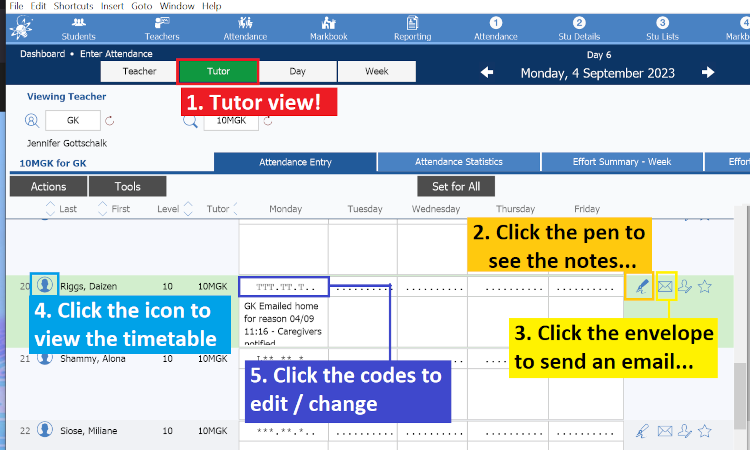
Here is a tutorial showing how you can follow up student attendance using KAMAR and a few quick steps. This hack works quite well with the quick parts hack. If you need the text for your ‘absence’ email, you can customise the content at the preceding link.
Tags: attendance, kamar

Read more articles

Previous PostQuick Parts

You Might Also Like

Read more about the article KAMAR – View Comments for a Class

KAMAR – View Comments for a Class

May 18, 2021
Read more about the article KAMAR – Adding Notices

KAMAR – Adding Notices

October 19, 2020
Read more about the article KAMAR Shortcuts

KAMAR Shortcuts

November 23, 2020

Recent Posts

  • MHS Printers
  • Turn It In – Basics
  • Chrome Profile
  • OneNote – Tips & Tricks
  • External Moderation History

Popular Posts