Skip to content
MHS Staff Online Help Hub
  • Topics
    • Assay
    • Browser Tips
    • EPIC
    • Flipped Learning
    • Forms
    • Google
    • KAMAR
    • MS Office
    • MS Teams
    • OneDrive
    • Tools
  • All Hacks
  • Resources
  • Support
    • Request a Hack
  • Toggle website search
Menu Close
  • Topics
    • Assay
    • Browser Tips
    • EPIC
    • Flipped Learning
    • Forms
    • Google
    • KAMAR
    • MS Office
    • MS Teams
    • OneDrive
    • Tools
  • All Hacks
  • Resources
  • Support
    • Request a Hack
  • Toggle website search

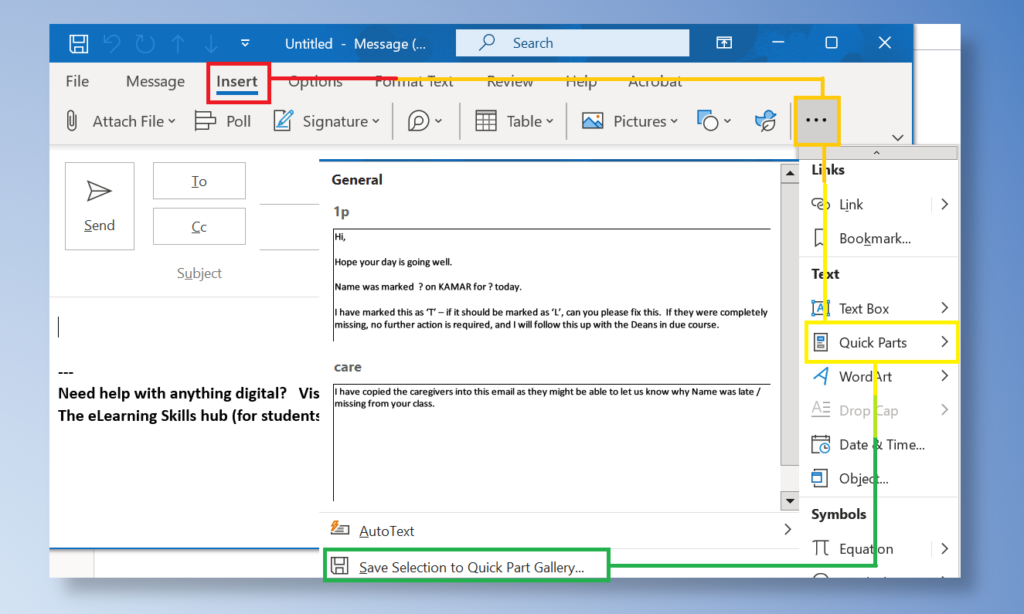
Quick Parts

Learn how to use ‘quick parts’ to instantly generate frequently used text in an email (this works in Word too). This is really useful for following up on attendance. The templates used in the video are at the preceding link.
Tags: attendance, email

Read more articles

Previous PostGroups on KAMAR
Next PostUltimate Attendance Hack

You Might Also Like

Read more about the article Attendance Follow Up

Attendance Follow Up

February 15, 2022
Read more about the article OneNote – Worksheets with Links

OneNote – Worksheets with Links

May 17, 2022
Read more about the article Timetable Template

Timetable Template

June 23, 2021

Recent Posts

  • MHS Printers
  • Turn It In – Basics
  • Chrome Profile
  • OneNote – Tips & Tricks
  • External Moderation History

Popular Posts