Skip to content
MHS Staff Online Help Hub
  • Topics
    • Assay
    • Browser Tips
    • EPIC
    • Flipped Learning
    • Forms
    • Google
    • KAMAR
    • MS Office
    • MS Teams
    • OneDrive
    • Tools
  • All Hacks
  • Resources
  • Support
    • Request a Hack
  • Toggle website search
Menu Close
  • Topics
    • Assay
    • Browser Tips
    • EPIC
    • Flipped Learning
    • Forms
    • Google
    • KAMAR
    • MS Office
    • MS Teams
    • OneDrive
    • Tools
  • All Hacks
  • Resources
  • Support
    • Request a Hack
  • Toggle website search

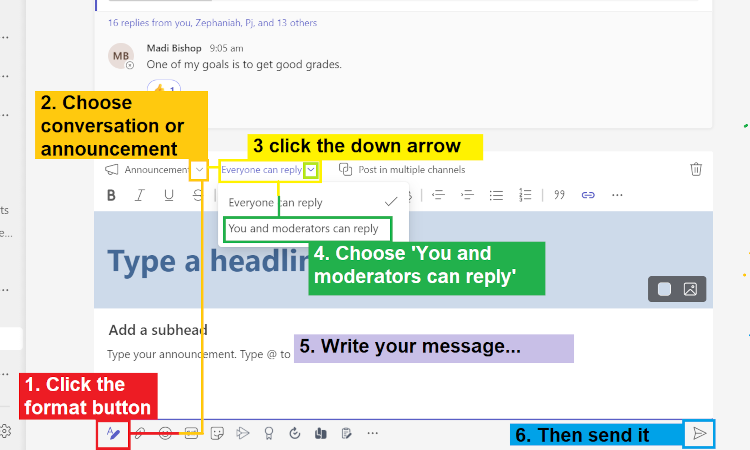
All Staff Communication in Teams

Here’s how you can ensure that your message does not get lost in a flood of replies / conversations.

You Might Also Like

Read more about the article Teams – View Only Access for Students

Teams – View Only Access for Students

February 19, 2023
Read more about the article Teams – File Sharing

Teams – File Sharing

October 19, 2020
Read more about the article Teams – Posting Messages

Teams – Posting Messages

February 14, 2021

Recent Posts

  • MHS Printers
  • Turn It In – Basics
  • Chrome Profile
  • OneNote – Tips & Tricks
  • External Moderation History

Popular Posts