Skip to content
MHS Staff Online Help Hub
  • Topics
    • Assay
    • Browser Tips
    • EPIC
    • Flipped Learning
    • Forms
    • Google
    • KAMAR
    • MS Office
    • MS Teams
    • OneDrive
    • Tools
  • All Hacks
  • Resources
  • Support
    • Request a Hack
  • Toggle website search
Menu Close
  • Topics
    • Assay
    • Browser Tips
    • EPIC
    • Flipped Learning
    • Forms
    • Google
    • KAMAR
    • MS Office
    • MS Teams
    • OneDrive
    • Tools
  • All Hacks
  • Resources
  • Support
    • Request a Hack
  • Toggle website search

Quickly Identify Students with Special Assessment Conditions

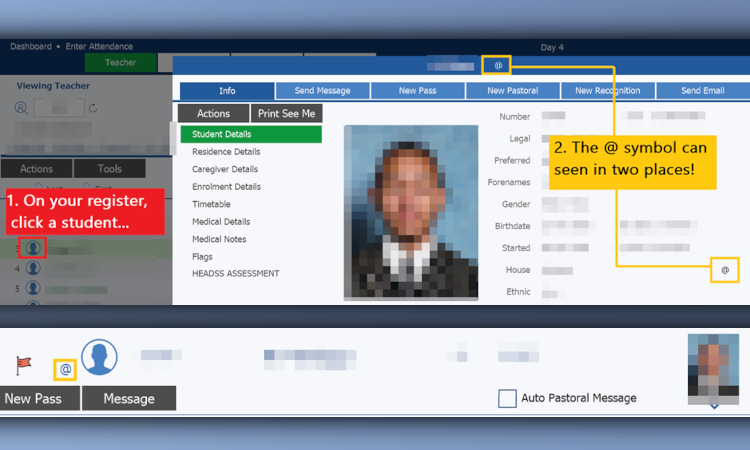
Learn how to quickly identify students with Special Assessment Conditions (SAC) and find out what accommodations need to be made for them.

Hint: On KAMAR, look for the @ symbol
Tags: SAC, Special Assessment Conditions

You Might Also Like

Read more about the article Kamar: Mark the Roll on your Phone

Kamar: Mark the Roll on your Phone

May 5, 2022
Read more about the article Groups on KAMAR

Groups on KAMAR

June 2, 2022
Read more about the article Attendance Follow Up

Attendance Follow Up

February 15, 2022

Recent Posts

  • MHS Printers
  • Turn It In – Basics
  • Chrome Profile
  • OneNote – Tips & Tricks
  • External Moderation History

Popular Posts