Skip to content
MHS Staff Online Help Hub
  • Topics
    • Assay
    • Browser Tips
    • EPIC
    • Flipped Learning
    • Forms
    • Google
    • KAMAR
    • MS Office
    • MS Teams
    • OneDrive
    • Tools
  • All Hacks
  • Resources
  • Support
    • Request a Hack
  • Toggle website search
Menu Close
  • Topics
    • Assay
    • Browser Tips
    • EPIC
    • Flipped Learning
    • Forms
    • Google
    • KAMAR
    • MS Office
    • MS Teams
    • OneDrive
    • Tools
  • All Hacks
  • Resources
  • Support
    • Request a Hack
  • Toggle website search

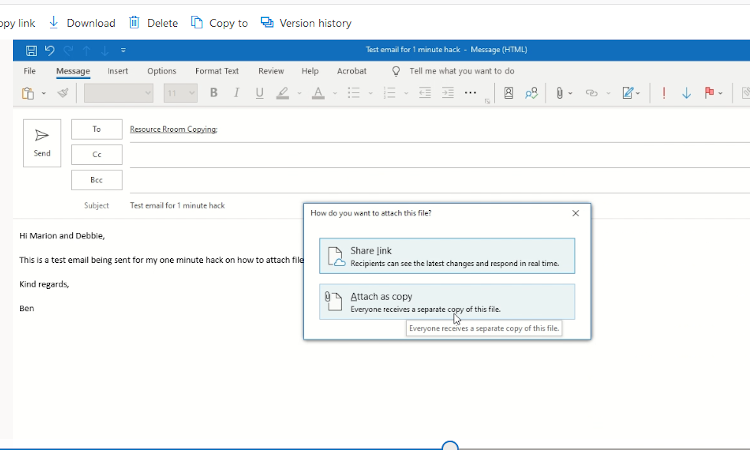
Files for Printing!

This quick hack shows how you can attach files so that they can be printed by the resource center.

Reminder: Email your files to copy4me@masseyhigh.school.nz
Tags: attach, email, outlook, printing

Read more articles

Previous PostKAMAR Letters
Next PostKAMAR – Student Emails

You Might Also Like

Read more about the article Attendance Follow Up

Attendance Follow Up

February 15, 2022
Read more about the article Quick Parts

Quick Parts

August 24, 2023
Read more about the article Email Rules

Email Rules

June 3, 2021

Leave a Reply Cancel reply

You must be logged in to post a comment.

Recent Posts

  • MHS Printers
  • Turn It In – Basics
  • Chrome Profile
  • OneNote – Tips & Tricks
  • External Moderation History

Popular Posts